Lesson #06: Interpreting Blueprint
The Plutus blueprint is the bridge between on-chain and off-chain code. This lesson covers how to interpret the blueprint generated by Aiken and translate it into offchain TypeScript code for interacting with your smart contracts.
Source code: GitHub
What is a Blueprint?
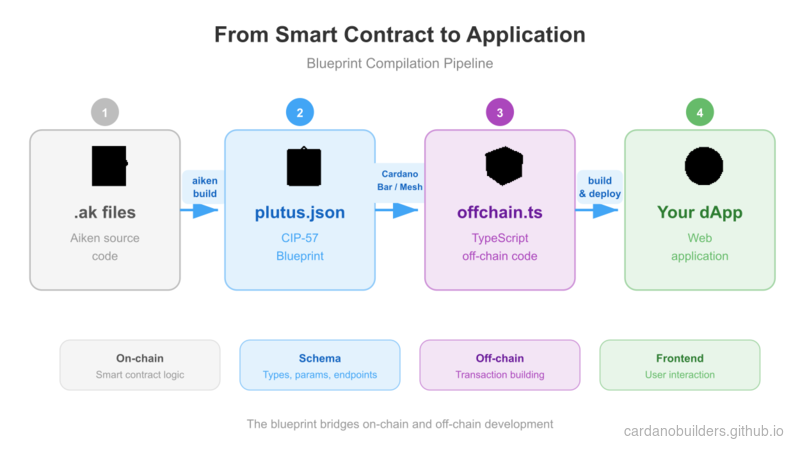
A blueprint is a standardized JSON file defined by CIP-57. It is the primary output of Cardano smart contract compilation and contains everything needed to interact with the contract. Every blueprint includes:
preamble: Meta-information about the contract.validators: Named validators with type definitions and compiled code.definitions: A registry of reusable definitions across the specification.
Generating a Blueprint
Generate a blueprint with Aiken:
- Build your contracts:
aiken build- Locate the blueprint in the
plutus.jsonfile at the root of your project.
Understanding the Blueprint
preamble
The preamble contains contract metadata: name, description, version, and Plutus version. The Plutus version is critical for offchain code preparation.
Example:
{
  "preamble": {
    "title": "meshsdk/aiken-template",
    "description": "Aiken contracts for project 'meshsdk/aiken-template'",
    "version": "0.0.0",
    "plutusVersion": "v3", // Key information for offchain code
    "compiler": {
      "name": "Aiken",
      "version": "v1.1.16+23061c0"
    },
    "license": "Apache-2.0"
  }
}
validators
The validators section contains type information for datum, redeemer, and parameters, along with compiled validator code. Types may reference reusable definitions from the definitions section.
Example:
{
  "title": "spend.spending_logics_delegated.spend",
  "datum": {
    "title": "_datum_opt",
    "schema": {
      "$ref": "#/definitions/Data"
    }
  },
  "redeemer": {
    "title": "_redeemer",
    "schema": {
      "$ref": "#/definitions/Data"
    }
  },
  "parameters": [
    {
      "title": "delegated_withdrawal_script_hash",
      "schema": {
        "$ref": "#/definitions/aiken~1crypto~1ScriptHash"
      }
    }
  ],
  "compiledCode": "58ac010100229800aba2aba1aba0aab9faab9eaab9dab9a9bae0024888888896600264646644b30013370e900118039baa001899914c004c03400a601a601c0052259800800c528456600266ebc00cc02cc03c00629462660040046020002805100d2444660020026eacc040c044c044c044c044c044c044c034dd518080048c020dd500099ba548008cc028dd4802a5eb822c8030c024004c024c028004c024004c010dd5004c52689b2b200401",
  "hash": "9c9666ddc12fc42f0151cd029c150c7d410ede9fe3885c248c8c26a0"
}
Note that spend.spending_logics_delegated.else compiles to the same hash as spend.spending_logics_delegated.spend. Both purposes share the same compiled script. Multi-purpose validators compile to a single hash, which certain architectures can leverage.
{
  "title": "spend.spending_logics_delegated.else",
  "redeemer": {
    "schema": {}
  },
  "parameters": [
    {
      "title": "delegated_withdrawal_script_hash",
      "schema": {
        "$ref": "#/definitions/aiken~1crypto~1ScriptHash"
      }
    }
  ],
  "compiledCode": "58ac010100229800aba2aba1aba0aab9faab9eaab9dab9a9bae0024888888896600264646644b30013370e900118039baa001899914c004c03400a601a601c0052259800800c528456600266ebc00cc02cc03c00629462660040046020002805100d2444660020026eacc040c044c044c044c044c044c044c034dd518080048c020dd500099ba548008cc028dd4802a5eb822c8030c024004c024c028004c024004c010dd5004c52689b2b200401",
  "hash": "9c9666ddc12fc42f0151cd029c150c7d410ede9fe3885c248c8c26a0"
}
definitions
The definitions section contains reusable type schemas referenced by the validators section.
Example:
{
  "definitions": {
    "Data": {
      "title": "Data",
      "description": "Any Plutus data."
    },
    "aiken/crypto/ScriptHash": {
      "title": "ScriptHash",
      "dataType": "bytes"
    },
    "cardano/assets/PolicyId": {
      "title": "PolicyId",
      "dataType": "bytes"
    },
    "withdraw/MyRedeemer": {
      "title": "MyRedeemer",
      "anyOf": [
        {
          "title": "ContinueCounting",
          "dataType": "constructor",
          "index": 0,
          "fields": []
        },
        {
          "title": "StopCounting",
          "dataType": "constructor",
          "index": 1,
          "fields": []
        }
      ]
    }
  }
}
Automating Offchain Code Generation
Manually translating blueprints into offchain code is time-consuming. The Cardano Bar VSCode Extension automates this process. Generate offchain code from your blueprint in three steps:
-
Create a new TypeScript file, e.g.,
offchain.ts. -
Open the command palette in VSCode (Ctrl+Shift+P or Cmd+Shift+P).
-
Type
Parse blueprint to Typescript - Meshand select it.
-
Select the
plutus.jsonfile that contains the blueprint.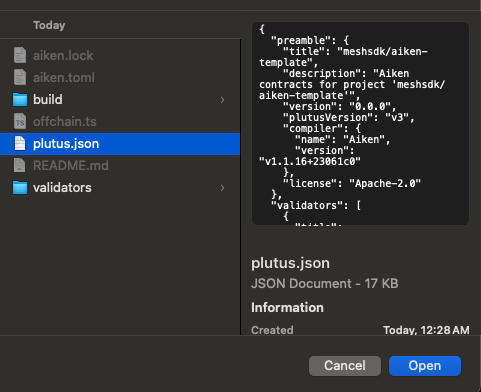
The generated offchain.ts file includes all functions needed to interact with the on-chain code: spending, minting, and querying the contract. See the Mesh SDK documentation for details.
Conclusion
Interpreting the Plutus blueprint is essential for connecting on-chain validators to off-chain applications. Tools like the Mesh Blueprint class and the Cardano Bar extension automate most of the translation work, letting you focus on building applications.
Source Code Walkthrough
This section walks through the project files with a focus on how the Plutus blueprint (plutus.json) bridges the gap between on-chain Aiken code and off-chain TypeScript applications.
Project Structure
06-interpreting-blueprint/
├── validators/
│   ├── withdraw.ak    # Withdrawal validator (OracleDatum, MyRedeemer types)
│   ├── spend.ak       # Spending validator delegating to withdrawal
│   └── mint.ak        # Minting validator delegating to withdrawal
├── aiken.toml         # Project manifest (like package.json)
├── aiken.lock         # Dependency lockfile (like bun.lockb)
└── plutus.json        # CIP-57 blueprint -- THE KEY FILE for this lesson
The three .ak validators follow the same delegation pattern from Lesson 5. What is new here is understanding plutus.json — the compiled artifact that makes off-chain integration possible.
The Compilation Pipeline
This is the full path from smart contract source code to a running application. The blueprint sits at the center — it is the artifact that both the blockchain and your TypeScript code understand.
Web2 Mental Model
If you have worked with REST APIs, the blueprint maps cleanly to concepts you already know:
| Blueprint Section | Web2 Equivalent | What It Does |
|---|---|---|
preamble | package.json metadata | Project name, version, compiler info, Plutus version |
validators | API endpoint definitions | Each validator’s purpose, parameters, and compiled bytecode |
validators[].compiledCode | Compiled binary or WASM module | The actual executable deployed on-chain |
validators[].parameters | Function arguments / route params | Values that must be supplied before the validator can run |
definitions | JSON Schema / TypeScript type definitions | Reusable type schemas referenced by validators |
Full plutus.json | OpenAPI (Swagger) specification | The single source of truth describing your contract’s interface |
Just as an OpenAPI spec lets you auto-generate API clients, the Plutus blueprint lets tools like the Mesh SDK auto-generate TypeScript code for interacting with your contracts.
plutus.json — The Blueprint in Detail
This is the most important file in the project for off-chain development. When you run aiken build, the compiler reads all .ak files and produces this single JSON file containing:
Preamble — Metadata about your project. The plutusVersion field (e.g., "v3") is critical because it tells off-chain libraries which Plutus language version to target when constructing transactions.
Validators — Each validator entry includes a title that encodes the file name, module name, and purpose (e.g., "spend.spending_logics_delegated.spend"). It also includes the compiledCode (hex-encoded CBOR of the Plutus script) and hash (the script’s on-chain address identifier). Notice that multi-purpose validators like spend.spending_logics_delegated.spend and spend.spending_logics_delegated.else share the same compiled code and hash.
Definitions — A registry of reusable types. When a validator’s datum or redeemer references "$ref": "#/definitions/withdraw/MyRedeemer", the actual type schema lives here. This is identical to how JSON Schema uses $ref to avoid duplicating type definitions.
The Validator Files
The three .ak files define the on-chain logic that compiles into the blueprint:
withdraw.ak defines the core types (OracleDatum, MyRedeemer with ContinueCounting and StopCounting variants) and the shared validation logic. These types appear in the definitions section of the blueprint.
spend.ak and mint.ak delegate to the withdrawal script, as covered in Lesson 5. Their compiled code appears as separate validator entries in the blueprint, each with its own hash for on-chain addressing.
From Blueprint to TypeScript
The Cardano Bar VSCode extension (described in the section above) reads plutus.json and generates TypeScript functions matching each validator. The generated code uses the Mesh SDK’s Blueprint class to deserialize the compiled code, apply parameters, and construct transactions. This is the same workflow as generating an API client from an OpenAPI spec — the blueprint is the contract, and the generated code is the client.
Source code
The source code for this lesson is available on GitHub.