Lesson #01: Hello World
This lesson covers the fundamentals of Cardano application development: installing the Mesh SDK, creating a wallet with MeshWallet, and sending lovelace using MeshTxBuilder.
Source code: GitHub
System setup
This course requires Node.js v24+. We recommend using nvm to manage your Node versions.
Create a package.json file
First, create a new package.json file in the root of your project with the following content:
{
  "type": "module",
  "dependencies": {},
  "scripts": {}
}
Install the necessary packages
Open your terminal and run these commands to install the MeshSDK:
npm install
npm install @meshsdk/core
Here’s how your package.json file should look after installing the package:
{
  "type": "module",
  "dependencies": {
    "@meshsdk/core": "^1.9.0",
  },
  "scripts": {}
}@meshsdk/core: Core functionality for network interactions, wallets, and transactions.
Create a wallet
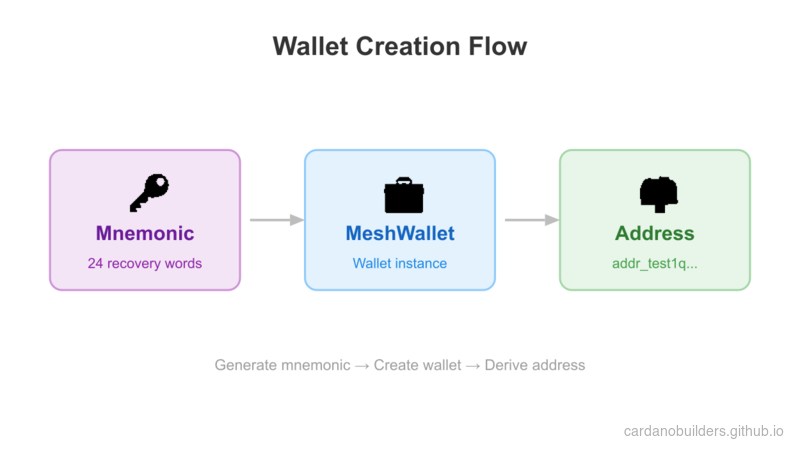
MeshWallet provides methods to create wallets, generate mnemonic phrases, and retrieve wallet addresses.
Generate mnemonic phrases
A mnemonic phrase is a set of words used to recover your wallet. Keep your mnemonic phrase safe and secure; anyone with access to it can control your funds.
Generate a new mnemonic:
import { MeshWallet } from "@meshsdk/core";

// Generate new mnemonic phrases for your wallet
const mnemonic = MeshWallet.brew();
console.log("Your mnemonic phrases are:", mnemonic);- Use the
brewmethod to generate a new mnemonic phrase.
Initialize the wallet and get the wallet address
With a mnemonic phrase generated, initialize the wallet:
// Initialize the wallet with a mnemonic key
const wallet = new MeshWallet({
  networkId: 0, // preprod testnet
  key: {
    type: "mnemonic",
    words: mnemonic as string[],
  },
});

// Get the wallet address
const address = await wallet.getChangeAddress();
console.log("Your wallet address is:", address);networkId: Specify the network, 0 for preprod testnet.key: Specify the key type and mnemonic phrases.getChangeAddress: Method to get the wallet address.
Run the code
Create a new file mnemonic.ts with the following code:
import { MeshWallet } from "@meshsdk/core";

// Generate new mnemonic phrases for your wallet
const mnemonic = MeshWallet.brew();
console.log("Your mnemonic phrases are:", mnemonic);

// Initialize the wallet with a mnemonic key
const wallet = new MeshWallet({
  networkId: 0, // preprod testnet
  key: {
    type: "mnemonic",
    words: mnemonic as string[],
  },
});

// Get the wallet address
const address = await wallet.getChangeAddress();
console.log("Your wallet address is:", address);
Update the package.json file to add a script to run the code:
{
  "type": "module",
  "dependencies": {
    "@meshsdk/core": "^1.9.0",
  },
  "scripts": {
    "mnemonic": "node mnemonic.ts"
  }
}
Run the script:
npm run mnemonicThis generates a new mnemonic phrase and wallet address. The output looks similar to:
> mnemonic
> node mnemonic.ts

Your mnemonic phrases are: [
  'access',  'spawn',   'taxi',
  'prefer',  'fortune', 'sword',
  'nerve',   'price',   'valid',
  'panther', 'sure',    'hello',
  'layer',   'try',     'grace',
  'seven',   'fossil',  'voice',
  'tobacco', 'circle',  'measure',
  'solar',   'pride',   'together'
]
Your wallet address is: addr_test1qptwuv6dl863u3k93mjrg0hgs0ahl08lfhsudxrwshcsx59cjxatme29s6cl7drjceknunry049shu9eudnsjvwqq9qsuem66d
Send lovelace
With a funded wallet, you can send lovelace using the MeshTxBuilder class to build and submit transactions to the network.
Get lovelace from faucet
Use the Cardano Preprod Testnet Faucet to get test lovelace. Paste your wallet address, click “Request funds,” and you will receive lovelace shortly.
Get Blockfrost API key
Transaction building requires fetching UTXOs from the network. Sign up for a free Blockfrost account and get a preprod API key (it starts with preprod). You can find the key in the “Projects” section of your Blockfrost dashboard.
Get wallet information
Retrieve the wallet’s UTXOs and change address:
// Get wallet data needed for the transaction
const utxos = await wallet.getUtxos();
const changeAddress = await wallet.getChangeAddress();getUtxos: Method to get the UTXOs from the wallet.getChangeAddress: Method to get the change address.
Create a transaction to send lovelace
Build the transaction using MeshTxBuilder:
// Create the transaction
const txBuilder = new MeshTxBuilder({
  fetcher: provider,
  verbose: true, // optional, prints the transaction body
});

const unsignedTx = await txBuilder
  .txOut(
    "addr_test1qpvx0sacufuypa2k4sngk7q40zc5c4npl337uusdh64kv0uafhxhu32dys6pvn6wlw8dav6cmp4pmtv7cc3yel9uu0nq93swx9",
    [{ unit: "lovelace", quantity: "1500000" }]
  )
  .changeAddress(changeAddress)
  .selectUtxosFrom(utxos)
.complete();txOut: Add the recipient address and amount.changeAddress: Set the change address.selectUtxosFrom: Provide wallet UTXOs into the transaction as inputs.complete: Create the transaction.
Sign and submit the transaction
Sign and submit the transaction to the network:
const signedTx = await wallet.signTx(unsignedTx);
const txHash = await wallet.submitTx(signedTx);
console.log("Transaction hash:", txHash);signTx: Method to sign the transaction, which will return the signed transaction.submitTx: Method to submit the transaction to the network.
Run the code
Create a new file send-lovelace.ts with the complete code:
import { BlockfrostProvider, MeshTxBuilder, MeshWallet } from "@meshsdk/core";

// Set up the blockchain provider with your key
const provider = new BlockfrostProvider("YOUR_KEY_HERE");

// Initialize the wallet with a mnemonic key
const wallet = new MeshWallet({
  networkId: 0,
  fetcher: provider,
  submitter: provider,
  key: {
    type: "mnemonic",
    words: ["your", "mnemonic", "...", "here"],
  },
});

// Get wallet data needed for the transaction
const utxos = await wallet.getUtxos();
const changeAddress = await wallet.getChangeAddress();

// Create the transaction
const txBuilder = new MeshTxBuilder({
  fetcher: provider,
  verbose: true, // optional, prints the transaction body
});

const unsignedTx = await txBuilder
  .txOut(
    "addr_test1qpvx0sacufuypa2k4sngk7q40zc5c4npl337uusdh64kv0uafhxhu32dys6pvn6wlw8dav6cmp4pmtv7cc3yel9uu0nq93swx9",
    [{ unit: "lovelace", quantity: "1500000" }]
  )
  .changeAddress(changeAddress)
  .selectUtxosFrom(utxos)
  .complete();

const signedTx = await wallet.signTx(unsignedTx);
const txHash = await wallet.submitTx(signedTx);
console.log("Transaction hash:", txHash);
Update the package.json file to add a script to run the code:
{
  "type": "module",
  "dependencies": {
    "@meshsdk/core": "^1.9.0",
  },
  "scripts": {
    "mnemonic": "node mnemonic.ts",
    "send-lovelace": "node send-lovelace.ts"
  }
}
Run the script:
npm run send-lovelaceThis builds, signs, and submits a lovelace transaction. The output looks similar to:
> send-lovelace
> node send-lovelace.ts

txBodyJson - before coin selection {"inputs":[],"outputs":[{"address":"addr_test1qpvx0sacufuypa2k4sngk7q40zc5c4npl337uusdh64kv0uafhxhu32dys6pvn6wlw8dav6cmp4pmtv7cc3yel9uu0nq93swx9","amount":[{"unit":"lovelace","quantity":"1500000"}]}],"fee":"0","collaterals":[],"requiredSignatures":[],"referenceInputs":[],"mints":[],"changeAddress":"addr_test1qp2k7wnshzngpqw0xmy33hvexw4aeg60yr79x3yeeqt3s2uvldqg2n2p8y4kyjm8sqfyg0tpq9042atz0fr8c3grjmysdp6yv3","metadata":{},"validityRange":{},"certificates":[],"withdrawals":[],"votes":[],"signingKey":[],"chainedTxs":[],"inputsForEvaluation":{},"network":"mainnet","expectedNumberKeyWitnesses":0,"expectedByronAddressWitnesses":[]}
txBodyJson - after coin selection {"inputs":[{"type":"PubKey","txIn":{"txHash":"99d859b305ab8021e497fad0dc55373e50fffd3e7026142fa3cf5accfe0d3aab","txIndex":1,"amount":[{"unit":"lovelace","quantity":"9823719"}],"address":"addr_test1qp2k7wnshzngpqw0xmy33hvexw4aeg60yr79x3yeeqt3s2uvldqg2n2p8y4kyjm8sqfyg0tpq9042atz0fr8c3grjmysdp6yv3"}}],"outputs":[{"address":"addr_test1qpvx0sacufuypa2k4sngk7q40zc5c4npl337uusdh64kv0uafhxhu32dys6pvn6wlw8dav6cmp4pmtv7cc3yel9uu0nq93swx9","amount":[{"unit":"lovelace","quantity":"1500000"}]},{"address":"addr_test1qp2k7wnshzngpqw0xmy33hvexw4aeg60yr79x3yeeqt3s2uvldqg2n2p8y4kyjm8sqfyg0tpq9042atz0fr8c3grjmysdp6yv3","amount":[{"unit":"lovelace","quantity":"8153730"}]}],"fee":"169989","collaterals":[],"requiredSignatures":[],"referenceInputs":[],"mints":[],"changeAddress":"addr_test1qp2k7wnshzngpqw0xmy33hvexw4aeg60yr79x3yeeqt3s2uvldqg2n2p8y4kyjm8sqfyg0tpq9042atz0fr8c3grjmysdp6yv3","metadata":{},"validityRange":{},"certificates":[],"withdrawals":[],"votes":[],"signingKey":[],"chainedTxs":[],"inputsForEvaluation":{"99d859b305ab8021e497fad0dc55373e50fffd3e7026142fa3cf5accfe0d3aab1":{"input":{"outputIndex":1,"txHash":"99d859b305ab8021e497fad0dc55373e50fffd3e7026142fa3cf5accfe0d3aab"},"output":{"address":"addr_test1qp2k7wnshzngpqw0xmy33hvexw4aeg60yr79x3yeeqt3s2uvldqg2n2p8y4kyjm8sqfyg0tpq9042atz0fr8c3grjmysdp6yv3","amount":[{"unit":"lovelace","quantity":"9823719"}]}}},"network":"mainnet","expectedNumberKeyWitnesses":0,"expectedByronAddressWitnesses":[]}
Transaction hash: 62a825c607e4ca5766325c2fccd7ee98313ff81b7e8a4af67eac421b0f0866ff
The transaction hash confirms your transaction was submitted. Setting verbose: true in MeshTxBuilder prints the transaction body before and after coin selection, which is useful for debugging.
Source Code Walkthrough
This section ties together the full picture of what you built, how the files relate, and how the concepts map to patterns you already know from web development.
Project Structure
01-wallet-send-lovelace/
├── package.json          # Project config with @meshsdk/core dependency
├── mnemonic.ts           # Generates wallet credentials (mnemonic + address)
└── send-lovelace.ts      # Builds, signs, and submits a lovelace transfer
This is a minimal Node.js project with no framework — just two standalone TypeScript scripts and a single dependency. Think of it like a CLI tool that talks to a remote API, except the “API” is the Cardano blockchain.
- package.json declares the project as an ES module and pulls in
@meshsdk/core, which handles all blockchain communication, wallet management, and transaction construction. - mnemonic.ts is a one-time setup script. It generates your wallet credentials (mnemonic phrase + derived address). You run it once, save the output, and use it in the next script.
- send-lovelace.ts is the main script. It initializes a wallet from your saved mnemonic, connects to the blockchain through Blockfrost, builds a transaction, signs it, and submits it.
Transaction Flow
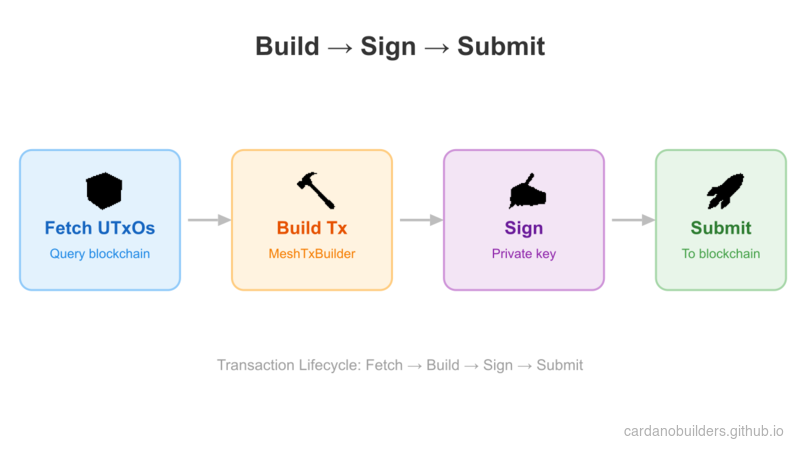
The flow follows a build-sign-submit pattern:
- Fetch state — The wallet queries the blockchain (via Blockfrost) for your available UTxOs.
- Build transaction —
MeshTxBuilderassembles the transaction: who receives funds, which UTxOs to spend, and where change goes. - Sign — Your wallet’s private key signs the transaction, proving you authorized the spend.
- Submit — The signed transaction is sent to the blockchain network through Blockfrost.
Web2 Equivalents
If you are coming from traditional web development, this table maps the blockchain concepts in this lesson to patterns you already know.
| Cardano Concept | Web2 Equivalent | Explanation |
|---|---|---|
| Mnemonic phrase | Master password / recovery key | A set of words that derives all your private keys. Losing it means losing access forever — there is no “forgot password” flow. |
| MeshWallet | Auth credentials + session | Holds your keys and signs requests on your behalf, similar to how an authenticated session authorizes API calls. |
| UTxO (Unspent Transaction Output) | Database row with a balance | Each UTxO is a discrete chunk of value. Spending means consuming existing rows and creating new ones, not updating a balance field in place. |
| BlockfrostProvider | REST API client / SDK | Handles all HTTP communication with the Cardano network. You configure it with an API key, just like any third-party service SDK. |
| MeshTxBuilder | Request builder (like an ORM query builder) | Chains methods to construct a transaction, similar to how query builders chain .where(), .select(), .limit(). |
| Transaction signing | Request signing (HMAC / JWT) | Cryptographically proves you authorized this specific transaction. Similar to signing API requests with a secret key. |
| Transaction hash | Response ID / receipt | A unique identifier for your submitted transaction. Use it to look up the transaction on a block explorer, like tracking a payment by its confirmation ID. |
| Testnet faucet | Sandbox environment with test data | Gives you free test tokens to experiment with, just like Stripe test mode or a sandbox API. |
Source code
The source code for this lesson is available on GitHub.
Challenge
Create a transaction that sends multiple assets to multiple addresses. Explore the Mesh SDK docs for more!